Exercise #7
Note: You probably will need to have a Slackware Linux environment to complete
this exercise, due to using its package database as part of the exercise. You can
omit the pkgdesc.php and mkpkg.db portion and do all the rest.
In this exercise create three php scripts to do the following:
config.php
- This file should contain the connection information for your DB and create
the
$myconnconnection resource handle.
mkdb.php
- This is a standalone executable PHP script, i.e.: put
#!/usr/bin/phpat the top of the file and make it executable (chmod a+x mklist.php). This script should create a table called 'pkgs' and read the list of packages out of the JSON filepkgs.jsonand import it into the database table with the following table fields:
Column Description idAn auto-incremented integer (and primary key) nameThe name of the package (and name of the file in /var/lib/pkgstools/packages/) also an index in the tabledescThe short description of the package
The JSON file is an array of "objects", each with a 'name' and 'desc' field.
Example pkgs.json:
[
  {"name":"ConsoleKit2-1.0.0-x86_64-4","desc":"ConsoleKit2 (user, login, and seat tracking framework)"},
  {"name":"Cython-0.29.10-x86_64-1","desc":"Cython (C bindings for Python)"},
  {"name":"GConf-3.2.6-x86_64-4","desc":"GConf (GNOME configuration library)"},
  ...
]
pkglist.php
-
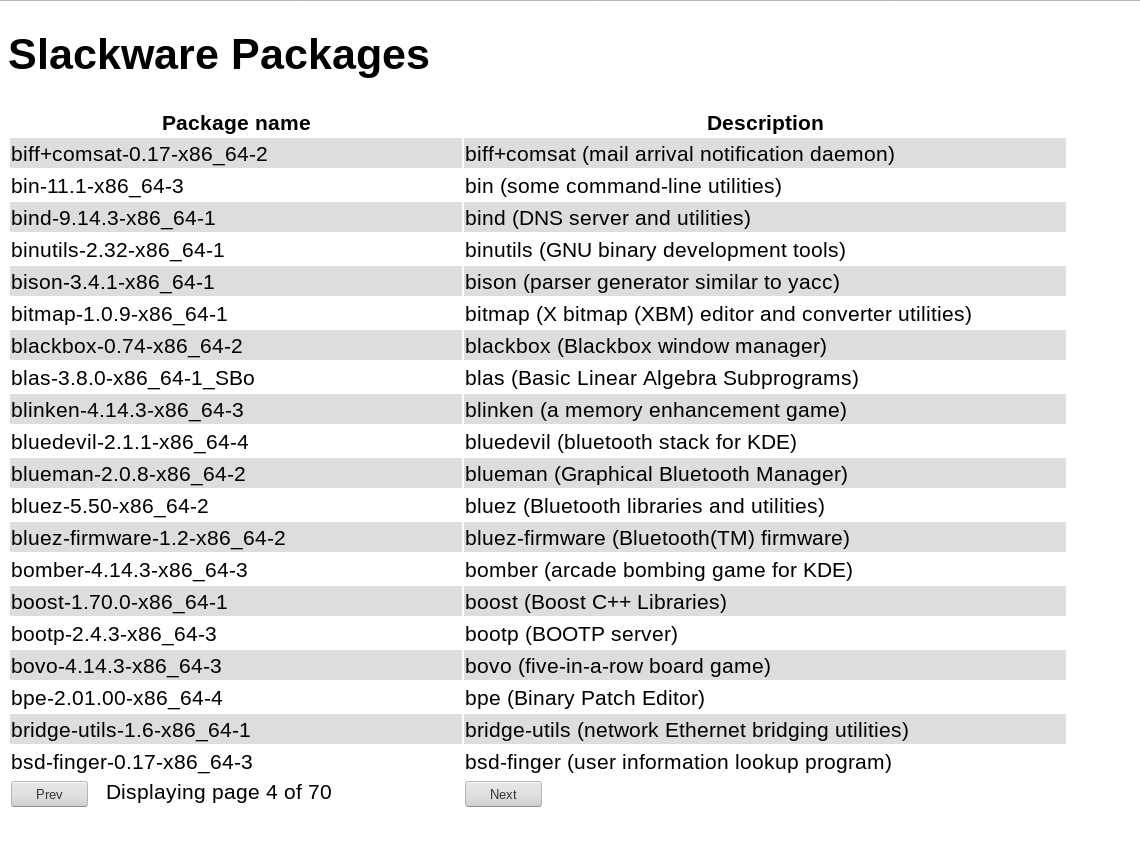
Creates a paginated list (a two column table, 20 entries per page) of package names and descriptions taken from the table you created in your database.
-
You have some leeway in the appearance of the table and rows, but there needs to be some kind of way to move from one page to another. The page to be displayed should be via a GET variable:
ex:pkglist.php?page=4 -
There should also be some indication of which page you are on (the page number may be 0 based) and optionally out of how many pages. If you want to know how many rows there are in a table, you can use:
"SELECT count(*) FROM pkgs" to get the number of rows. -
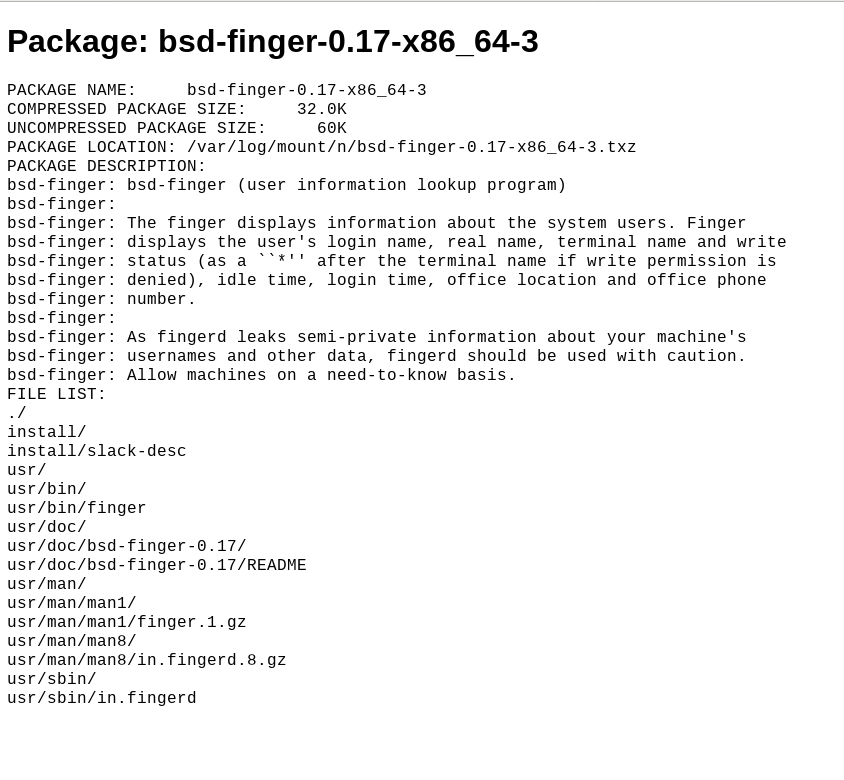
When a package name or description (or optionally the entire row) is clicked on it should take you to the
pkgdesc.phpscript passing it a GET variable telling it which package contents to display (by it's ID number.)
pkgdesc.php
-
It should open the file given to it in
/var/lib/pkgtools/packages/and display the contents in the browser. The id of the file should be passed to it via a GET variable, i.e.:
ex:pkgdesc.php?id=23 -
There may optionally be a button to take you back to the pkglist view, but the page you were on should be somehow preserved.
mkpkgs.db
- This should be able to generate the pkgs.json file by scanning the directory
in
/var/lib/pkgtools/packages/(usescandir()), where the filename is the 'name' field the first line in the file following thePACKAGE DESCRIPTIONline to use as the 'desc' field.
PHP functions you may need to complete this assignment:
scandir()
file_get_contents() , file_put_contents()
json_encode() , json_decode()
explode() , trim()
isset() , count() , ciel() , min() , max()